Step by step
How to log in to SSO Rajasthan
You'll need your SSO ID (username) and password. Logging in takes under a minute.
A clear, step-by-step guide to logging in to your Rajasthan Single Sign-On account, plus every common login error and exactly how to fix it.
You'll need your SSO ID (username) and password. Logging in takes under a minute.
Visit sso.rajasthan.gov.in and always verify the URL begins with https:// before typing your credentials.
Type your username and password. The password field stays hidden for security.
Enter the 6-digit code from the security image. Click the refresh icon if it's hard to read.
You land on your dashboard with every linked service visible in one place.
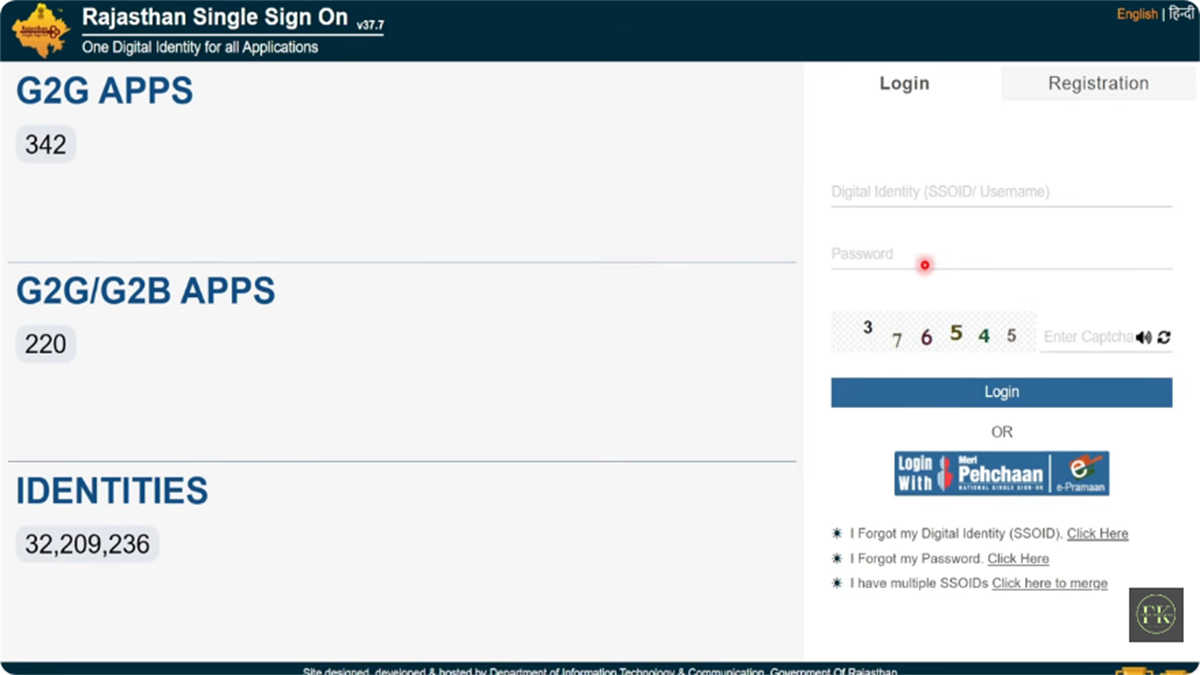
If you registered with one of these, you can log in the same way, no separate password needed.
Log in using your Jan Aadhaar credentials if you registered as a Rajasthan resident.
Use the Google button if your SSO ID was created via a Gmail account.
Available if you linked a Facebook account during registration.
The Raj SSO Android app supports fingerprint and face-ID login. See below.
| Error | Solution |
|---|---|
| "Invalid username / password" | Use the "I Forgot my Digital Identity (SSOID)" or "I Forgot my Password" links on the login page. See recovery. |
| "Connection not private" | Check your device's date & time. An incorrect clock triggers SSL certificate errors. |
| Captcha not loading | Clear your browser cache (Ctrl+Shift+Del) or open the portal in a private / incognito window. |
| Account locked | Too many failed attempts. Wait 30 minutes, or reset your password to unlock immediately. |
During exam-season slowdowns, the official app is often faster than the website.
Download Raj SSO only from the official Google Play Store listing by the Government of Rajasthan. Once installed, sign in with your SSO ID and password once, then enable biometric login (fingerprint or face) for instant access afterwards.
Traffic spikes near exam deadlines. Clear your cache or use a private window, and try off-peak, before 9 AM or after 8 PM. The Raj SSO app is a good alternative during slowdowns.
First confirm your username is correct, it's your SSO ID, not your email. If it still fails, reset the password from the "I Forgot my Password" link. Repeated failures lock the account for 30 minutes.
Yes, enable biometric login in the official Raj SSO app so you don't re-enter your password each time. Avoid this on shared devices.
It's almost always a cache issue. Clear browsing data (Ctrl+Shift+Del), or open the login page in incognito mode.
Registration and recruitment forms need a correctly sized photo. Prep it here before you start, all on your device.